Flat Strings
Flat Strings
Flat strings are defined by a single line of text.
e.g. Big.Buck.Bunny.2008.BluRay.1080p.MP2.2.0.x264.
NfoForge will automatically use the formatter in flat mode for paths (files and folders).
Format
FileTokens are only available in flat mode when used directly in NfoForge. You'll notice that flat tokens have a single set of brackets, e.g., {title}.
Usage
A token string is simply a combination of tokens and text.
What is a string?
A string is a sequence of characters. This includes letters, numbers, and symbols.
Example of a token string:
{title_clean} {release_year} {edition} {re_release} {source} {resolution} {audio_codec} {audio_channel_s} {video_dynamic_range_type_inc_sdr_over_1080} {video_codec}
When filled:
The output will vary based on the file that is opened. If you are familiar with Radarr/Sonarr, this works very similarly.
Optional Text
You can use tokens with an optional syntax to only add text if the token is filled by the formatter. This is done with the syntax :opt=*:, where you replace the asterisk with whatever text you want.
Example of a token string with opt syntax:
{title_clean} {:opt=(:release_year:opt=):} {edition} {re_release} {source} {resolution} {audio_codec} {audio_channel_s} {video_dynamic_range_type_inc_sdr_over_1080} {video_codec}
Note the token {:opt=(:release_year:opt=):}. We're using :opt=(: and :opt=): to wrap the year with parentheses. This allows for many use cases and enables a high degree of customization.
When filled with opt syntax:
You can see this in action in real time inside NfoForge under Settings -> Movies Management.
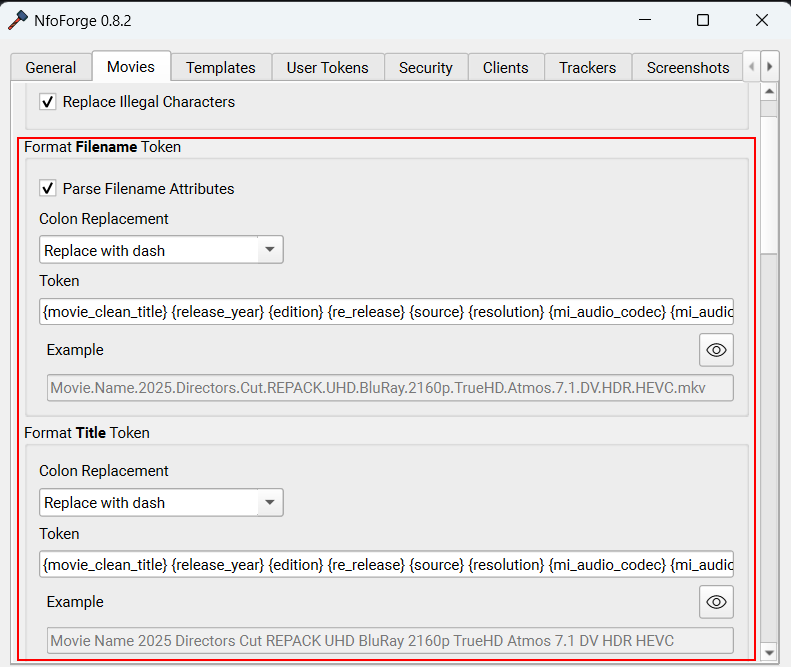
Filters
You can apply several filters to filled tokens to fine-tune your output. Each example below defines a string and shows the result before and after applying a filter. Filters are simple to use:
- Define a filter using the
|character inside the brackets, immediately after the token name:{token|filter}. - You can still use opt for optional text, but filters are only applied to the token value itself. The filter must be placed before opt. For example:
{:opt=x:token|filter:opt=x:}.
Info
Filters work identically to their Python equivalents.
upper
{example_token} = tom
lower
{example_token} = TOM
title
{example_token} = TOM
swapcase
{example_token} = Tom
capitalize
{example_token} = tom
zfill
{example_token} = 42
replace
{example_token} = tom
You can use single or double quotes for the arguments, and any character (including commas, spaces, or quotes) can be replaced. For example:
default
Supplies a value when the token resolves to nothing. Every other filter describes a value it was given, so it is skipped when there is nothing to describe; default is the one filter that acts on an empty token.
{release_group} = (no release group)
When the token does have a value, default leaves it alone.
only_if / unless
Keeps or drops a value depending on whether other tokens resolve to anything. only_if keeps the value only when every token it names has a value; unless drops the value when any of them does. Both take one or more comma-separated token names.
This is how one template can carry two component orders and emit whichever fits the release. Several trackers order a remux differently from an encode — audio last for a remux, audio first for an encode:
{resolution} {source}{:opt= :remux}{:opt= :video_dynamic_range_type|only_if(remux)}{:opt= :video_codec|only_if(remux)}{:opt= :audio_codec}{:opt= :audio_channel_s}{:opt= :video_dynamic_range_type|unless(remux)}{:opt= :video_codec|unless(remux)}
Naming a token that does not exist leaves the value untouched and logs a warning, so a typo cannot silently delete a component.
Tip
Write the separator as part of the token ({:opt= :token}) rather than as a literal space between tokens. The optional string disappears along with the value, so a filter that blanks a token cannot leave a stray space or a dangling - behind.
Chained Filters
You can chain multiple filters together by separating them with |. Filters are applied in order from left to right.
{example_token} = tom
Additional Information
There are three built-in rename token strings:
- Filename token string
- The filename (or folder, if applicable) is shared across all trackers.
- There can only be one of these tokens.
- Title token string (global)
- A single global token shared across all trackers that don't have an override.
- Per-tracker Title token string override
- Overrides the global title token for each tracker.